💻 🏦
Code You Can Bank On
Documentation
Amelia McNamara
Where we left off
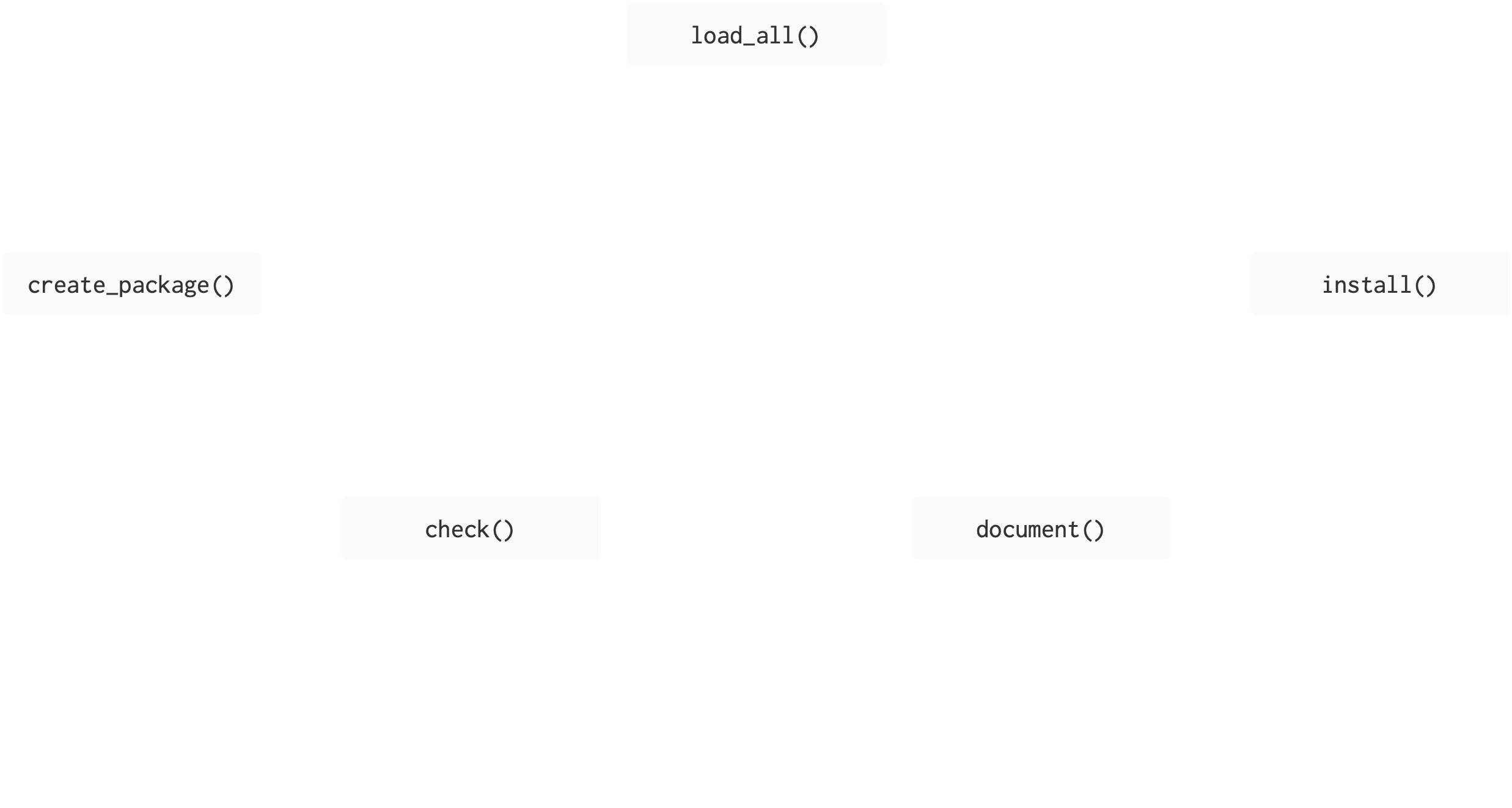
Figure adapted from Packages, by Hannah Frick
BLT
├── BLT.Rproj
├── DESCRIPTION
├── NAMESPACE
├── R
│   ├── AR1.R
│   ├── BLT-package.R
│   ├── BLT_ggplot_na_distribution.R
│   ├── data.R
│   ├── perc_missing.R
│   └── perc_missing_tidy.R
├── README.Rmd
├── README.md
├── data
├── data
│   ├── bacon.rda
│   ├── lettuce.rda
│   └── tomatoes.rda
├── man
│   ├── AR1.Rd
│   ├── BLT-package.Rd
│   ├── BLT_ggplot_na_distribution.Rd
│   ├── bacon.Rd
│   ├── figures
│   │   └── README-pressure-1.png
│   ├── perc_missing.Rd
│   └── perc_missing_tidy.Rd
├── tests
│   ├── testthat
│   ├── testthat
│   │   ├── _snaps
│   │   │   └── BLT_ggplot_na_distribution
│   │   │       ├── tomato-na-dist.new.svg
│   │   │       └── tomato-na-dist.svg
│   │   ├── test-BLT_ggplot_na_distribution.R
│   │   └── test-perc_missing_tidy.R
│   └── testthat.R
└── vignettes
    ├── BLT.Rmd
    └── BLT.html
unchanged
changed
changed by you
Where we’re heading
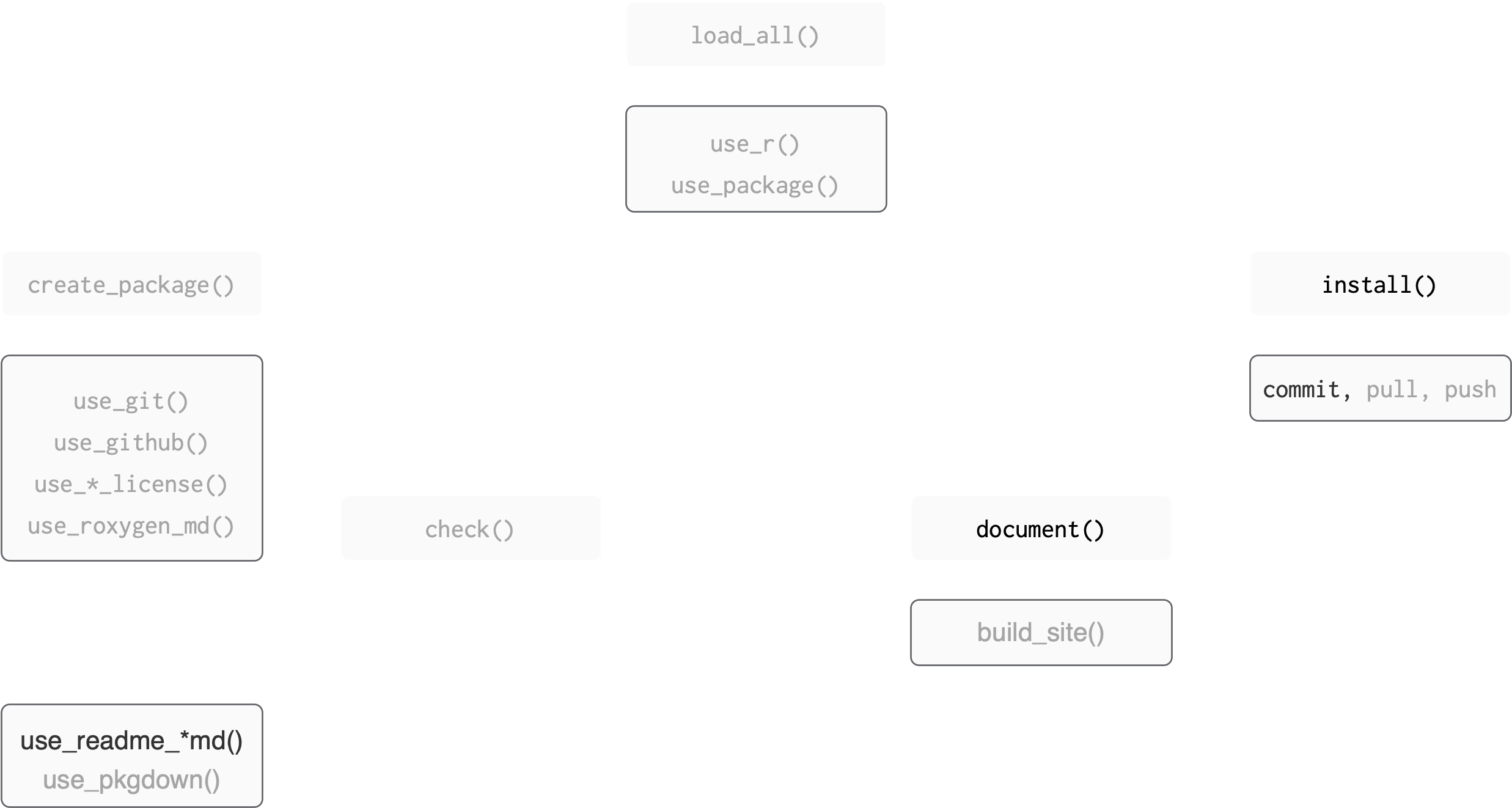
Figure adapted from Packages, by Hannah Frick
BLT
├── BLT.Rproj
├── DESCRIPTION
├── NAMESPACE
├── R
│   ├── AR1.R
│   ├── BLT-package.R
│   ├── data.R
│   ├── perc_missing.R
│   └── perc_missing_tidy.R
├── README.Rmd
├── README.md
├── data
│   ├── bacon.rda
│   ├── lettuce.rda
│   └── tomatoes.rda
├── man
│   ├── AR1.Rd
│   ├── BLT-package.Rd
│   ├── bacon.Rd
│   ├── figures
│   │   └── README-pressure-1.png
│   ├── perc_missing.Rd
│   └── perc_missing_tidy.Rd
└── vignettes
    ├── BLT.Rmd
    └── BLT.html
unchanged
changed
changed by you
🏷️ Document your package
Levels of package documentation
Metadata: The
DESCRIPTIONfile – “what’s in this package?”Object documentation: for functions and data
Package-level documentation
- Vignettes: Long form documentation
DESCRIPTION
Metadata in DESCRIPTION
Title: One line, title case, with no period. Fewer than 65 characters.
Version
for release: MAJOR.MINOR.PATCH version.
for development version: MAJOR.MINOR.PATCH.9000
Authors@R:
“aut” means author, “cre” means creator, “ctb” means contributor.
Edit DESCRIPTION (your turn)
Open DESCRIPTION file to edit it:
Authors@Rfield usesoptions("usethis.description")- we set this in our
.Rprofile, so go back to the intro slides if you missed this!
- we set this in our
✏️ edit Title field. Should be one line, title case, with no period. Fewer than 65 characters.
💾 save DESCRIPTION file
BLT
├── BLT.Rproj
├── DESCRIPTION
├── NAMESPACE
├── R
│   ├── AR1.R
│   ├── BLT-package.R
│   ├── data.R
│   ├── perc_missing.R
│   └── perc_missing_tidy.R
├── data
│   ├── bacon.rda
│   ├── lettuce.rda
│   └── tomatoes.rda
unchanged
changed
changed by you
Edit DESCRIPTION
Package: BLT
Title: Work with Data on Bacon, Lettuce, and Tomatoes
Version: 0.0.0.9000
Authors@R:
    person("Amelia", "McNamara", , "amelia.mcnamara@stthomas.edu", role = c("aut", "cre"))
Description: What the package does (one paragraph).
License: `use_mit_license()`, `use_gpl3_license()` or friends to pick a
    license
Encoding: UTF-8
Roxygen: list(markdown = TRUE)
RoxygenNote: 7.3.3
Metadata in DESCRIPTION
Description: One paragraph describing what the package does. Keep the width of the paragraph to 80 characters; indent subsequent lines with 4 spaces.
License
Encoding: How to encode text, use UTF-8 encoding.
LazyData: Use true to lazy-load data sets in the package.
Edit DESCRIPTION
🎬 Edit the description
👀 The full stop matters!
Add a license
lets the world know how it can use the stuff you create
- CRAN requires you to specify a (valid) license
- May be less relevant in your usecase!
other choices include
use_apl2_license(): Apache 2.0use_gpl3_license(): GPL3
uses
option("usethis.full_name")oroption("devtools.name")- we set this in
.Rprofile
- we set this in
BLT
├── BLT.Rproj
├── DESCRIPTION
├── NAMESPACE
├── R
│   ├── AR1.R
│   ├── BLT-package.R
│   ├── data.R
│   ├── perc_missing.R
│   └── perc_missing_tidy.R
├── data
│   ├── bacon.rda
│   ├── lettuce.rda
│   └── tomatoes.rda
unchanged
changed
changed by you
Commit
Now would be a good time to commit your changes.

Jason Long, CC BY 3.0 <https://creativecommons.org/licenses/by/3.0>, via Wikimedia Commons
Object documentation
Object documentation
- Object documentation is what you see when you use
?orhelp()
Files are written in a special “R documentation” format:
.Rd.Rdresembles LaTeX
.Rd example
Here’s parse_number.Rd from the readr package
% Generated by roxygen2: do not edit by hand
% Please edit documentation in R/collectors.R
\name{parse_number}
\alias{parse_number}
\alias{col_number}
\title{Parse numbers, flexibly}
\usage{
parse_number(x, na = c("", "NA"), locale = default_locale(), trim_ws = TRUE)

col_number()
}
\arguments{
\item{x}{Character vector of values to parse.}

\item{na}{Character vector of strings to interpret as missing values. Set this
option to \code{character()} to indicate no missing values.}

\item{locale}{The locale controls defaults that vary from place to place.
The default locale is US-centric (like R), but you can use
\code{\link[=locale]{locale()}} to create your own locale that controls things like
the default time zone, encoding, decimal mark, big mark, and day/month
names.}
Object documentation
🥳 We don’t have to write it!!
We write “roxygen comments” in the
.RfilesThese get turned into
.RdformatFunctions from
roxygen2do the work but we can usedevtoolsfunctions to call them.
makes it much easier to create and maintain your function documentation
lets you use a markdown-like syntax
BLT
├── BLT.Rproj
├── DESCRIPTION
├── NAMESPACE
├── R
│   ├── AR1.R
│   ├── BLT-package.R
│   ├── data.R
│   ├── perc_missing.R
│   └── perc_missing_tidy.R
├── data
│   ├── bacon.rda
│   ├── lettuce.rda
│   └── tomatoes.rda
unchanged
changed
changed by you
Object documentation workflow
- Insert roxygen skeleton to
.Rfiles - Add roxygen comments
- the
#'indicates it is a roxygen comment
- Run
devtools::document()to convert roxygen comments to.Rdfiles.
- Load the package with
devtools::load_all()
- Preview documentation with
?
- Repeat until the documentation looks the way you want.
Roxygen comments and tags
#'indicates it is a roxygen comment@indicates a roxygen tag@param arg— describe the inputs@examples— show how the function works@seealso— point out related functions@return— describe the outputs@export— is this a user visible function
Document your function
Open AR1.R (use_r() will do it if you don’t want to click)
Place your cursor on a blank line between the { ✏️ }
RStudio IDE menu: Code > Insert Roxygen Skeleton
🎬 Give your function a title and a brief description
🎬 Define the parameter(s)
🎬 Describe what the function returns
Our answer
🎬 Save AR1.R
Build documentation
🎬 Run devtools::document() to turn roxygen comments to .Rd
ℹ Updating BLT documentation
ℹ Loading BLT
Writing NAMESPACE
Writing AR1.Rd
Warning message:
[AR1.R:13] @examples requires a value
We will that fix later!
BLT
├── BLT.Rproj
├── DESCRIPTION
├── NAMESPACE
├── R
│   ├── AR1.R
│   ├── BLT-package.R
│   ├── perc_missing.R
│   └── perc_missing_tidy.R
├── data
│   ├── bacon.rda
│   ├── lettuce.rda
│   └── tomatoes.rda
├── man
│   └── AR1.Rd
unchanged
changed
changed by you
NAMESPACEnow lists the exported functionman/AR1.Rdhas been written
Take a look
🎬 Load the package : devtools::load_all()
🎬 Preview the documentation with:
😮 🥳
Fix warning
We need to add a usage example!
🎬 Under @examples, add one example for using your function
Look again
🎬 Save AR1.R, run devtools::document() followed by devtools::load_all()
🎬 Preview the documentation with ?AR1 and edit if needed
Getting fancier
So far, we’ve just written plain text in our documentation. But if you have spent time exploring R help pages, you will remember that there are often links. We can add those to our documentation, as well.
More documentation
Take a few minutes and document your other functions. Recall:
RStudio IDE menu: Code > Insert Roxygen Skeleton
document()
load_all()
check()Bonus: add examples for each
Commit
Now would be a good time to commit your changes
Jason Long, CC BY 3.0 <https://creativecommons.org/licenses/by/3.0>, via Wikimedia Commons
Package-level help page
Package-level help page
🎬 What happens if you do:
Package-level help page
We can fix this with use_package_doc()
🎬 Add a package-level help page:
🎬 Run devtools::document() then devtools::load_all() followed by ?BLT
BLT ├── BLT.Rproj ├── DESCRIPTION ├── NAMESPACE ├── R │ ├── AR1.R │ ├── BLT-package.R │ ├── perc_missing.R │ └── perc_missing_tidy. ├── data │ ├── bacon.rda │ ├── lettuce.rda │ └── tomatoes.rda ├── man │ ├── AR1.Rd │ └── BLT-package.Rd
unchanged
changed
changed by you
devtools::check()
This is a good time to run R CMD check to ensure our package is in full working order.
🎬 Use devtools to run R CMD check
Commit
Now would be a good time to commit your changes
Jason Long, CC BY 3.0 <https://creativecommons.org/licenses/by/3.0>, via Wikimedia Commons
Documenting data
Documenting data
Data gets documented in the data.R file. How can we create and open this file for editing?
Unfortunately, the trick to insert Roxygen skeleton doesn’t work with data, so we have to do the documentation more manually.
Documenting data
Here’s what the who documentation in tidyr looks like
#' World Health Organization TB data
#'
#' A subset of data from the World Health Organization Global Tuberculosis
#' Report ...
#'
#' @format ## `who`
#' A data frame with 7,240 rows and 60 columns:
#' \describe{
#' \item{country}{Country name}
#' \item{iso2, iso3}{2 & 3 letter ISO country codes}
#' \item{year}{Year}
#' ...
#' }
#' @source <https://www.who.int/teams/global-tuberculosis-programme/data>
"who"Can you write some documentation for the bacon data?
Documenting data (your turn)
#' FRED bacon price data
#'
#' A subset of data on the average price of sliced bacon in the US.
#' Data is from 2016 to 2026
#'
#' @format ## `bacon`
#' A data frame with 119 rows and 5 columns:
#' \describe{
#' \item{date}{Date of observation}
#' \item{series_id}{APU0000704111, the series ID for the series}
#' \item{value}{the average price of bacon at that date}
#' \item{real_timestart, realtime_end}{the date the data was downloaded}
#' }
#' @source <https://fred.stlouisfed.org/series/APU0000704111>
"bacon"BLT ├── BLT.Rproj ├── DESCRIPTION ├── NAMESPACE ├── R │ ├── AR1.R │ ├── BLT-package.R │ ├── data.R │ ├── perc_missing.R │ └── perc_missing_tidy.R ├── data │ ├── bacon.rda │ ├── lettuce.rda │ └── tomatoes.rda ├── man │ ├── AR1.Rd │ ├── BLT-package.Rd │ └── bacon.Rd
unchanged
changed
changed by you
Commit
document()
load_all()
check()Now would be a good time to commit your changes
Jason Long, CC BY 3.0 <https://creativecommons.org/licenses/by/3.0>, via Wikimedia Commons
Package dependencies
Package dependencies
So far, we have just used use_package() to add Imports to our package. But, there are multiple levels of dependency possible.
Imports: must be installed for your package to work. If they’re not, they will get installed.
Suggests: used by your package, but not required. Might provide data for examples, to run tests, build vignettes.
Depends: Avoid where possible. When your package requires a specific version of R, e.g.
Depends: R (>= 3.4.0). Think critically: downstream effects on packages that depend on your package.
Importing functions
We used imputeTS::statsNA() multiple times in our package.
which will:
- to add the package to the
DESCRIPTIONimports - add
@importFrom imputeTS statsNAtoBLT-package.RandNAMESPACE - mean we can avoid
::
@importFrom pkg fun
🎬 Import statsNA() from imputeTS:
Importing functions
Now, we could go back and remove the imputeTS:: piece of our code.
Suggests
Are used by your package, but not required for it to work
Might provide data for examples
Packages listed in Suggests are not automatically installed along with your package.
This means that you can’t assume the package is available
Commit
Now would be a good time to commit your changes
Jason Long, CC BY 3.0 <https://creativecommons.org/licenses/by/3.0>, via Wikimedia Commons
Additional documentation for packages
Additional documentation for packages
README.md: Really useful when sharing things on GitHub or GitLab. Can be the first file read by the user.Vignette: A long-form guide to your package. Can describe the problem that your package is designed to solve, and then show the reader how to solve it.
Package website
README
README.md
Big picture goes in the README:
- High-level purpose of the package
- Simple example
- Installation instructions
- Description of main features with links to vignettes
README.rmd
You are likely to have code in the README.md
Generating it with RMarkdown or Quarto is helpful
usethis helps out again!
usethis::use_readme_rmd() will:
- generate a template
README.Rmdwhich- outputs a GitHub markdown doc
- contains reminders of things to include
- has tips
- adds the
README.Rmdto the.Rbuildignore - adds a “pre-commit” hook to ensure you knit to
mdbefore committing
If you would prefer to work in Quarto, you can! But you’ll have to make the file yourself.
Add a README.Rmd
🎬 Add a README.Rmd with:
Template
🎬 Examine your README.Rmd
- GitHub markdown
- reminder to edit
README.Rmdrather thanREADME.md - Sets up some recommended knitr options
Render
You need to render README.Rmd regularly, to keep README.md up-to-date.
devtools::build_readme() is handy for this.
devtools::build_readme()
- creates
README.md - creates
man/figures/README-pressure-1.png
Edit README.Rmd
🎬 Complete: “The goal of BLT is to …”
🎬 Add: an example with AR1()
🎬 Remove: non-relevant sections
🎬 devtools::build_readme()
OR if it doesn’t work to install a temporary version of your package,
install() and then knit manually.
BLT
├── BLT.Rproj
├── DESCRIPTION
├── NAMESPACE
├── R
│   ├── AR1.R
│   ├── BLT-package.R
│   ├── data.R
│   ├── perc_missing.R
│   └── perc_missing_tidy.R
├── README.Rmd
├── README.md
├── data
│   ├── bacon.rda
│   ├── lettuce.rda
│   └── tomatoes.rda
├── man
│   ├──  AR1.Rd
│   ├──  BLT-package.Rd
│   ├── bacon.Rd
│   ├── figures
│   │   └── README-pressure-1.png
unchanged
changed
changed by you
An answer
Complete: “The goal of BLT is to …”
The goal of BLT is to provide helper functions for time
series analysis, to work on data about bacon, lettuce, and
tomatoes. Remove: non-relevant sections
Everything after “What is special about using……”
Commit
Now would be a good time to commit your changes.
Jason Long, CC BY 3.0 <https://creativecommons.org/licenses/by/3.0>, via Wikimedia Commons
Add a badge to the README.Rmd (we’re skipping this)
Badges give information to the user about the state of the package
For example: 
To add this badge, we set up a “GitHub Action”
A GitHub Action is “continuous integration” which allows you to automate package building, testing and deployment on github
Actions we add are triggered when we push to GitHub.
Adding a R CMD check action (we’re skipping this)
Adding the R CMD check action along with an edit to the README.Rmd will:
run
R CMD checkon multiple OS on GitHub andadd badge with the result to the
README.Rmd
We can add with usethis::use_github_action_check_standard()
R-CMD-check.yaml (we’re skipping this)
# Workflow derived from https://github.com/r-lib/actions/tree/v2/examples
# Need help debugging build failures? Start at https://github.com/r-lib/actions#where-to-find-help
on:
  push:
    branches: [main, master]
  pull_request:
    branches: [main, master]

name: R-CMD-check

jobs:
  R-CMD-check:
    runs-on: ${{ matrix.config.os }}

    name: ${{ matrix.config.os }} (${{ matrix.config.r }})

    strategy:
      fail-fast: false
      matrix:
        config:
          - {os: macOS-latest,   r: 'release'}
          - {os: windows-latest, r: 'release'}
          - {os: ubuntu-latest,   r: 'devel', http-user-agent: 'release'}
          - {os: ubuntu-latest,   r: 'release'}
          - {os: ubuntu-latest,   r: 'oldrel-1'}

    env:
      GITHUB_PAT: ${{ secrets.GITHUB_TOKEN }}
      R_KEEP_PKG_SOURCE: yes

    steps:
      - uses: actions/checkout@v2

      - uses: r-lib/actions/setup-pandoc@v2

      - uses: r-lib/actions/setup-r@v2
        with:
          r-version: ${{ matrix.config.r }}
          http-user-agent: ${{ matrix.config.http-user-agent }}
          use-public-rspm: true

      - uses: r-lib/actions/setup-r-dependencies@v2
        with:
          extra-packages: any::rcmdcheck
          needs: check

      - uses: r-lib/actions/check-r-package@v2
        with:
          upload-snapshots: true
Vignettes
Vignettes
- A long-form guide to your package.
- Function documentation is useful if you know the function name
- A vignette explains how to use your package
- Can describe the problem that your package is designed to solve, and then show the reader how to solve it.
Add a vignette
🎬 Add a vignette called “BLT” with
What’s happened?
✔ Setting active project to "/Users/amcnamara2/BLT".
✔ Adding knitr to Suggests field in DESCRIPTION.
✔ Adding "inst/doc" to .gitignore.
✔ Adding rmarkdown to Suggests field in DESCRIPTION.
✔ Adding "knitr" to VignetteBuilder.
✔ Creating vignettes/.
✔ Adding "*.html" and "*.R" to vignettes/.gitignore.
✔ Writing vignettes/BLT.Rmd.
☐ Modify vignettes/BLT.Rmd.
Edit vignettes/BLT.Rmd
🎬 Add info to vignettes/BLT.Rmd
An answer
The goal of BLT is to provide some time series helper functions, which allow you to work with data on bacon, lettuce, and tomatoes.
The package contains three sample datasets from FRED
The function AR1 is a convenience function to make a first-order autoregressive model. We can use this to model the bacon data
The function perc_missing allows you to compute the percent of a time series that is missing
Or, you can use the tidy version, perc_missing_tidy()
Preview the Vignette
🎬 Build the vignette with:
ℹ Installing BLT in temporary library
ℹ Building /Users/amcnamara2/BLT/vignettes/BLT.Rmd
[WARNING] Deprecated: --highlight-style. Use --syntax-highlighting instead.
(I’m choosing to ignore this warning– it sounds like something for the devtools developers, not me.)
BLT
├── BLT.Rproj
├── DESCRIPTION
├── NAMESPACE
├── R
│   ├── AR1.R
│   ├── BLT-package.R
│   ├── data.R
│   ├── perc_missing.R
│   └── perc_missing_tidy.R
├── README.Rmd
├── README.md
├── data
│   ├── bacon.rda
│   ├── lettuce.rda
│   └── tomatoes.rda
├── man
│   ├──  AR1.Rd
│   ├──  BLT-package.Rd
│   ├── bacon.Rd
│   ├── figures
│   │   └── README-pressure-1.png
└── vignettes
    ├── BLT.Rmd
    └── BLT.html
unchanged
changed
changed by you
Commit
Now would be a good time to commit your changes.
Jason Long, CC BY 3.0 <https://creativecommons.org/licenses/by/3.0>, via Wikimedia Commons
pkgdown sites (we’re skipping this)
pkgdown sites (we’re skipping this)
pkgdown is designed to make it quick and easy to build a website for your package.
Examples
Very widely used
Uses your existing documentation
- Home page - from
README.md - Get started - from overall pkg vignette
- Function Reference - from documentation in
man/ - Articles - from other vignettes
Commit
Now would be a good time to commit your changes.
Jason Long, CC BY 3.0 <https://creativecommons.org/licenses/by/3.0>, via Wikimedia Commons
Summary
Summary
Figure adapted from Packages, by Hannah Frick
BLT
├── BLT.Rproj
├── DESCRIPTION
├── NAMESPACE
├── R
│   ├── AR1.R
│   ├── BLT-package.R
│   ├── data.R
│   ├── perc_missing.R
│   └── perc_missing_tidy.R
├── README.Rmd
├── README.md
├── data
│   ├── bacon.rda
│   ├── lettuce.rda
│   └── tomatoes.rda
├── man
│   ├── AR1.Rd
│   ├── BLT-package.Rd
│   ├── bacon.Rd
│   ├── figures
│   │   └── README-pressure-1.png
│   ├── perc_missing.Rd
│   └── perc_missing_tidy.Rd
└── vignettes
    ├── BLT.Rmd
    └── BLT.html
unchanged
changed
changed by you
Summary
- A package has metadata and object documentation (essential), vignettes and
pkgdownsites (optional) - Metadata is in the
DESCRIPTION- some fields need manual editing
- some fields are appropriately edited by
devtoolsworkflow functions
- Objects like functions and data are documented with roxygen comments then turned into documentation with
devtools::document()- roxygen comments are indicated with
#' - roxygen tags start with
@
- roxygen comments are indicated with
Summary
- Package dependencies need to be documented
- package dependencies are added with
use_package() - functions from dependencies are called with
pkg::function() - we don’t use
library()
- package dependencies are added with
Summary
- Always include a
README.mdwith the purpose of the package, installation instructions and a simple example usethis::use_readme_rmd()will generate a templateREADME.Rmdand do other useful thingsdevtools::build_readme()will buildREADME.mdfromREADME.Rmd- A GitHub Actions is a “continuous integration” tool which allows you to automate package building, testing and deployment on GitHub
usethis::use_github_action_check_standard()will add theR CMD checkaction and a badge
Summary
- A vignette gives a more detailed explanation of how your package can be used
- You can add a vignette with
usethis::use_vignette(name_of_vignette) pkgdownmakes it quick and easy to build a website for your package from the existing documentationusethis::use_pkgdown()configures your package to use apkgdownwebsitepkgdown::build_site()will build the website so you can examine it locallyusethis::use_pkgdown_github_pages()sets up a GitHub action to automatically build and publish your site on pushing.usethisreally rocks!
Resources
- R packages, Hadley Wickham and Jenny Bryan.
- Documenting datasets